
Transform your business
...with virtual assistants
Latest Blog Posts

Virtual Bookkeeping Assistant Services for Daily Records and Reporting
A virtual bookkeeping assistant keeps your financial records current by recording transactions, tracking payables and receivables, reconciling accounts, and preparing reports. Organized books give you a clearer picture of your business finances and help you make decisions without first sorting through a backlog of receipts and invoices.
Bookkeeping can become difficult to keep up with when you’re also handling customers, operations, and growth. Delegating the recurring recordkeeping gives you more room to focus, while your books stay organized for review and planning. This article explains what the role can cover, how daily tasks fit together, and what to consider when deciding which bookkeeping work to delegate. You’ll also see where the work of a bookkeeper can support a smoother operating routine.
Key Takeaways
- Set clear routines for invoice approvals and follow-ups so outstanding payments don’t disappear in the daily workload.
- Agree on how unusual transactions and missing records should be flagged, keeping exceptions visible for your review.
- Use reconciliation to spot differences between business records and account statements, then resolve them before relying on reports.
- Choose bookkeeping tasks to delegate based on what repeats, takes time, and needs consistent attention.
Accounts payable and receivable support
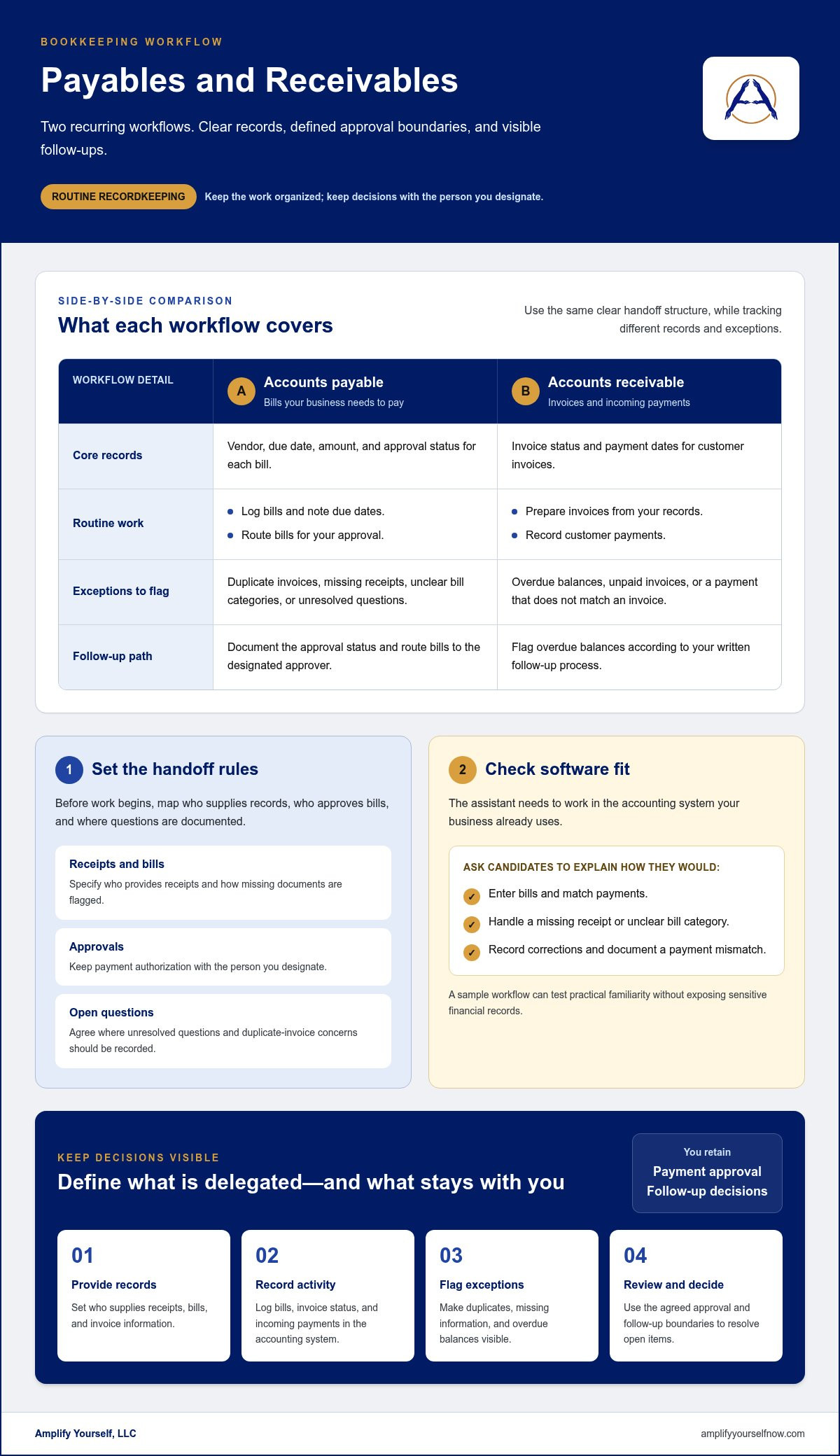
A bookkeeping assistant can organize bills, track due dates, record customer invoices, and monitor incoming payments. For accounts payable, the workflow may include logging bills, noting due dates, and routing them for your approval. For accounts receivable, it may include preparing invoices from your records, recording payments, and flagging overdue balances. You retain control of payment authorization and customer follow-up decisions.
Before hiring, map the steps you want handled. Decide who provides receipts, who approves bills, and how the assistant should flag a duplicate invoice. For customer payments, specify where records are entered and what to do when an invoice remains unpaid. Clear instructions reduce back-and-forth and help keep routine work consistent.
Software compatibility matters because the assistant needs to work in the accounting system your business already uses. Share the software name during hiring and ask candidates to describe their experience with it. Ask how they handle a missing receipt, an unclear bill category, or a payment that doesn’t match an invoice. You can also describe a sample workflow and ask the candidate to explain each step. This tests practical familiarity without exposing sensitive financial records.
- Payables: Record bills with vendor, due date, amount, and approval status. Keep payment approval with the person you designate.
- Receivables: Maintain invoice status and payment dates. Flag overdue balances according to your written follow-up process.
- Software experience: Ask candidates to explain how they enter bills, match payments, and record corrections in your accounting system.
- Access and handoff: Define which records the assistant can use and where they should document unresolved questions.
For ongoing support with these records, a bookkeeping assistant service can help handle routine bookkeeping tasks. Start by listing the recurring invoices, bills, and payment records you want organized, then use that list to define the role and its approval boundaries.
Bank reconciliation and financial reporting
Reconciliation compares recorded activity with bank and credit card statements. Clear reports then turn those records into useful information.
Bank and Credit Card Reconciliation
A bookkeeper compares each bank statement entry with the corresponding transaction in your accounting records. The same process applies to credit card statements, including charges, payments, refunds, and fees. Ask how the assistant identifies unmatched items and records corrections. For example, a bank fee needs a corresponding entry before the account balances agree.
Set a repeatable process for each account. Provide statement files or access, identify the accounts to reconcile, and agree on where unresolved differences should be recorded. Review the reconciliation summary for missing transactions, duplicates, or mismatched amounts. A useful handoff shows what was matched and which items still need your decision.
Financial Reporting
Reporting support can include preparing profit and loss statements, balance sheets, and cash flow reports from your bookkeeping records. Each answers a different question: whether recorded income exceeds expenses, what the business owns and owes, and how cash moved during a selected period. Ask which reports the assistant prepares and what records they rely on.
Agree on the reporting period, delivery format, and review process before work begins. For example, you might request a monthly report that highlights notable changes and lists transactions needing clarification separately. Check that report totals align with reconciled accounts, then review unusual movements before using the figures for planning.
A practical handoff follows a consistent sequence: collect statements, reconcile accounts, document exceptions, and prepare reports from updated records. Define who supplies documents and who resolves unclear transactions. This keeps open questions visible instead of burying them in a spreadsheet or email thread.
- Account coverage: List every bank and credit card account included in the reconciliation.
- Exception notes: Record unmatched items, the amount, and the action needed.
- Report expectations: Specify the reports, period, and delivery format you need.
- Review ownership: Assign a person to assess corrections and report findings.
If you plan to delegate recurring financial workflows, include bookkeeping in your broader delegation plan.
Daily expense and transaction recording
Create a consistent routine for capturing purchases and entering them into your bookkeeping system. Clear instructions make records easier to review.
Daily Expense Recording
Decide how receipts reach the assistant, such as through a shared folder or expense app. For each purchase, provide the receipt and explain its business purpose. A receipt for office supplies, for example, should include enough context to distinguish the purchase from a personal expense. Agree on how to flag missing documents so entries don’t remain unsupported.
Define the details each expense entry needs: transaction date, vendor, amount, payment method, and receipt location. Provide a sample entry for a recurring purchase, such as a software subscription, and explain how to record refunds or corrected receipts. A short written procedure gives the assistant a repeatable reference and helps you review entries consistently.
Transaction Entry and Categorization
Transaction entry means recording financial activity in your accounting system and assigning each item to the appropriate account. Share your existing category list and examples of common transactions. Explain, for instance, how you classify shipping charges, client refunds, or software renewals. These examples help the assistant follow your rules instead of making assumptions.
Agree on how to handle unfamiliar transactions. The assistant can flag an item with its date, description, and amount, then leave the category unresolved for your review. Ask candidates how they prevent duplicate entries and document corrections. A useful process keeps an audit trail in the accounting system and records why an entry changed.
- Set the source: Identify where receipts and transaction details will be shared.
- Define required fields: Specify the date, vendor, amount, purpose, and receipt location.
- Share examples: Show how recurring expenses and refunds should be categorized.
- Agree on exceptions: Explain how unclear or duplicate entries should be flagged.
Before work begins, provide a sample set of transactions and review the entries together. This practical exercise shows whether your instructions are clear and where the workflow needs adjustment.
Bookkeeping virtual assistant tasks
A virtual bookkeeping assistant can maintain transaction records, organize receipts, track invoices, reconcile accounts, and prepare reports. Define the recurring work first, then distinguish tasks the assistant completes from decisions you retain. For example, the assistant can flag an unclear expense while you approve its category.
Costs vary by workload and arrangement. An in-house bookkeeper involves employment costs and direct management, while a bookkeeping firm may bundle services. Compare the tasks included, review responsibilities, and communication expectations, not just the hourly rate.
In the United States, cost depends on workload, transaction volume, software, reporting needs, and the level of support. These factors shape the scope and determine the quoted price.
Choose a human assistant for work that requires context, handling exceptions, and communicating with your team. Accounting software can automate parts of transaction entry, but records still need review for missing receipts or unusual charges. Many businesses use software for routine capture and a person to review exceptions.
To hire and onboard, list recurring duties, name the accounting platform, and define access permissions. Ask candidates how they handle an unclear expense or duplicate entry. Start with a sample workflow, share written procedures, and review early work together. Assign an internal contact for questions and approvals.
- Task scope: List records, reports, and recurring follow-ups the role covers.
- Software: Identify your platform and the tasks it supports.
- Judgment: Set rules for flagging exceptions and requesting approval.
- Onboarding: Provide procedures, access, and a review process.
Use these steps to define the workload before delegating. Discuss your bookkeeping workflow and identify which recurring tasks are ready to hand off.
Amplify Yourself: Executive Virtual Assistant
Amplify Yourself, LLC connects business owners with virtual assistants, including bookkeepers, to help delegate recurring work. Turn to its bookkeeping support when transaction entry, account records, and reporting are taking time away from running your business. Define the tasks, software, approval boundaries, and reporting needs you’ve identified to create a practical handoff.
If bookkeeping is only part of your workload, an Executive Virtual Assistant can support broader administrative tasks. The right role depends on what needs consistent attention and which responsibilities you’re ready to delegate. Clear expectations make it easier to assign ownership and focus on decisions that need your attention.
Contact Amplify Yourself, LLC to discuss your delegation needs.
Make Delegation Part of Your Operating Plan
Start by deciding what you want financial records to make easier: reviewing cash flow, preparing for business decisions, or reducing time spent on routine administration. A virtual bookkeeping assistant can support that goal when responsibilities, approval boundaries, and handoffs are clear. Begin with the work that repeatedly distracts you from running the business, then document how you want it handled.
As your needs evolve, bookkeeping may become part of a wider delegation plan. Amplify Yourself, LLC also offers an Executive Virtual Assistant, Customer Support Representative, and E-Commerce VA for different operational needs. Keep each role focused on the work it supports, and expand delegation as your processes become clearer.
When you’re ready to discuss bookkeeping support and a practical next step, contact Amplify Yourself, LLC. Build a more manageable workflow one clearly defined responsibility at a time.
Frequently Asked Questions
What does a Bookkeeping virtual assistant do?
A bookkeeping virtual assistant carries out assigned bookkeeping processes and organizes work for your review. For example, they can prepare a list of unresolved items, such as transactions without a clear business purpose, rather than decide how to classify them. Set expectations for what they complete independently, what they flag, and which questions require your approval.
What accounting tools does my assistant work in?
Your assistant should work in the accounting platform and file-sharing systems your business already uses. Before assigning tasks, identify the platform, user permissions, and records needed. Walk through a sample transaction together, from source document to recorded entry, and confirm the assistant can follow your process without changing your setup.
What is a virtual bookkeeping assistant?
A virtual bookkeeping assistant is a remote professional who supports a business’s bookkeeping workflow. The role focuses on following defined recordkeeping processes, documenting questions, and preparing information for the owner’s review. For example, a business might delegate routine record organization while retaining responsibility for financial decisions. A written scope distinguishes bookkeeping support from planning or management.
What bookkeeping work can a remote assistant handle?
Depending on your workflow, an assistant can organize source documents, maintain vendor and customer records, prepare transaction information, and assemble files for period-end review. You might also assign them to track missing documents or unresolved entries. Define the expected output for each task, such as an updated record or an exception list, so you can assess completion.
What qualifications and software should I look for?
Look for relevant bookkeeping experience, careful record handling, and familiarity with your accounting software. Ask candidates how they would approach a mismatched transaction or unclear receipt. Their answers can show whether they follow instructions, document questions, and recognize when your approval is needed. Confirm that their working style fits your review and communication process.
What bookkeeping software and integrations do remote assistants use?
The tools depend on your business’s existing setup. An accounting platform may connect with invoicing, expense tracking, document storage, or payment processing systems, but each connection needs a defined purpose. Map where information originates, where it should be recorded, and who reviews it. This helps prevent duplicate entry and clarifies which permissions the assistant needs.

READY TO GIVE US A TRY?
Get Started for Free Today!
We'll connect you with top overseas talent for all your business endeavors.
Call 925-515-9343
Email: [email protected]


Privacy Policy | ©2026 Amplify Yourself, LLC. All Rights Reserved
Instagram
LinkedIn