
Transform your business
...with virtual assistants
Latest Blog Posts

Data Entry Virtual Assistant Services for Small Businesses
A data entry virtual assistant can handle recurring tasks such as updating records, organizing files, and transferring information between systems. To make the work reliable, define the source, destination, completion rules, and review process before delegating. Start with a focused task rather than assigning every kind of information work at once.
It makes sense to look for a straightforward way into virtual assistance: data entry work can include updating records, organizing files, and transferring information between systems. But accuracy and a consistent workflow matter just as much as speed. This article explains which tasks a virtual assistant can handle, the skills and software commonly used, and how small businesses can maintain dependable records. If you’re considering offering the service yourself, you’ll also learn how to define your tasks and present them clearly to potential clients.
Key Takeaways
- Start with defined, repeatable tasks such as updating customer details or organizing product information, then set a clear process for reviewing completed work.
- Build accuracy, attention to detail, and confidence with the tools your clients already use before expanding the services you offer.
- Keep electronic records consistent with agreed naming rules, access controls, and regular checks so information stays useful and organized.
- To start offering data entry services, choose a focused task set, explain your workflow, and show potential clients how you’ll protect accuracy and meet their needs.
Beginner-friendly data entry tasks
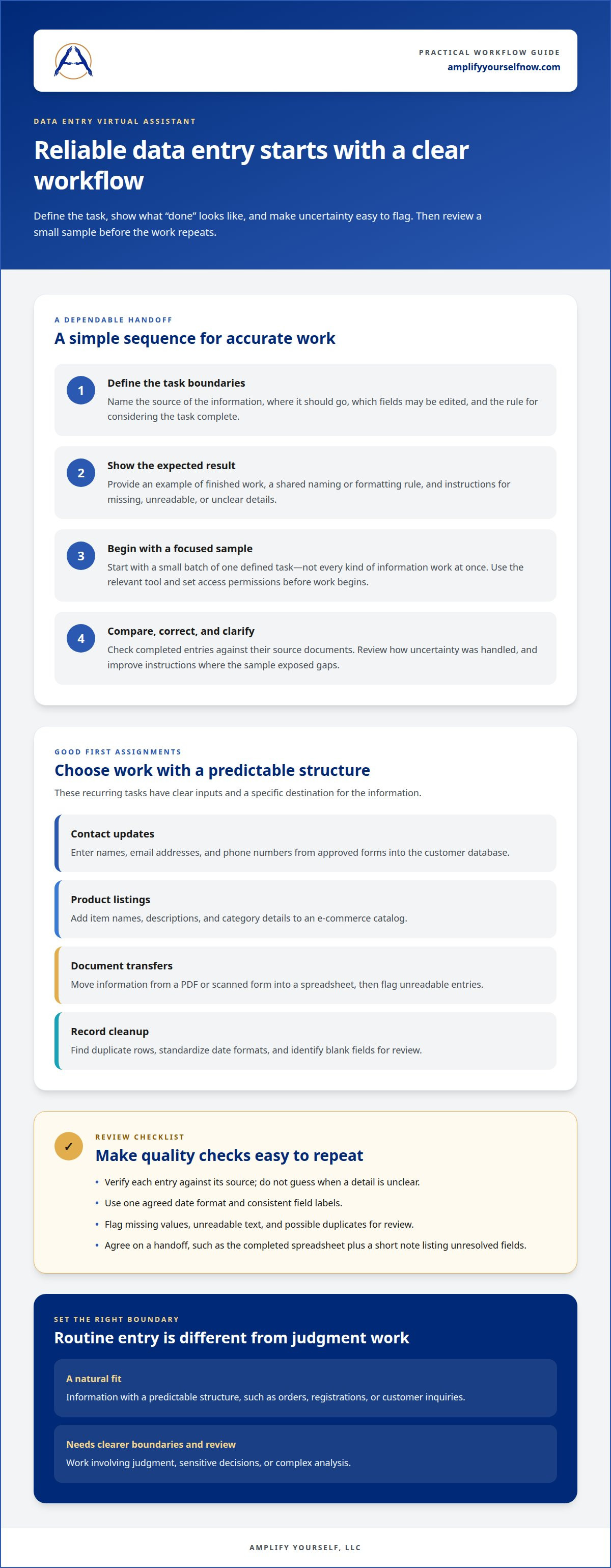
A data entry virtual assistant can take repetitive information work off your schedule. Start with tasks that have a clear source, destination, and completion rule. For example, they might transfer customer details from intake forms into a spreadsheet, update contact records, or add product descriptions to an online catalog.
A virtual assistant can also organize routine files, such as renaming invoices in a consistent format, sorting receipts into monthly folders, or transferring information from a PDF into Google Sheets. Provide an example of the finished work and explain what to do when a field is missing or unclear.
- Contact updates: Enter names, email addresses, and phone numbers from approved forms into the customer database.
- Product listings: Add item names, descriptions, and category details to an e-commerce catalog.
- Document transfers: Move information from a PDF or scanned form into a spreadsheet, then flag unreadable entries.
- Record cleanup: Find duplicate rows, standardize date formats, and identify blank fields for review.
Keep quality checks straightforward. Begin with a small sample batch, then compare completed entries with their source documents. A checklist might ask the assistant to verify each email address against its source, use one date format, and flag uncertain details instead of guessing. This helps protect record accuracy and makes corrections easier to track.
Routine data entry is a good fit when the information follows a predictable structure, such as orders, registrations, or customer inquiries. Work involving judgment, sensitive decisions, or complex analysis needs clearer boundaries and review. A defined process also makes delegation easier to expand as the workload grows. Explore data entry support for examples of how these tasks can fit into a small business workflow.
Data entry skills and software
Accuracy begins with careful reading, consistent formatting, and attention to detail. A capable assistant can distinguish similar entries, such as “Suite 4” and “Suite 14,” without changing the source information. They should also know when to flag a missing value instead of guessing. These habits matter in spreadsheets, customer records, and product catalogs.
Choose software to fit the workflow. Microsoft Excel and Google Sheets support tables, sorting, filters, and basic formulas. Airtable can organize records into linked views, while a customer relationship management system such as Salesforce stores contact and sales information. Before work begins, select the relevant tool and set access permissions and instructions.
- Spreadsheet skills: Sort records, apply filters, format dates consistently, and use basic formulas to spot blanks.
- Typing and review: Enter information accurately, compare entries with source documents, and flag unclear text.
- File handling: Rename documents with a shared format and place them in the correct folders.
- System familiarity: Follow the steps for adding or updating records in tools such as Shopify or Salesforce.
Use a sample task based on your actual workflow to assess these skills. Provide a small set of fictional or appropriately protected records, a written example, and a clear output format. Check whether the assistant follows field labels, preserves spelling, and flags uncertain entries. The review can also reveal where your instructions need more detail.
Agree on the handoff format, too. You might request a completed spreadsheet and a short note listing unresolved fields. Keep one approved template, and document any changes to column names or entry rules. This reduces confusion when work repeats or another team member reviews the file.
If your records need consistent entry support, explore data entry services as one possible fit for the workflow.
Database and electronic records maintenance
Reliable records depend on clear rules for creating, updating, and retiring information. In a customer database, define fields such as contact name, account status, and last interaction. Set one approved value for each field, such as “Active,” rather than mixing “active,” “Current,” and “Open.” Consistent labels make records easier to search and report.
Set a maintenance process before assigning ongoing database work. Specify which system is the source of truth, which fields the assistant can edit, and how to flag conflicting details. If a customer has two profiles with different email addresses, for example, the assistant should flag the duplicate for review rather than merge the records without guidance.
- Standardize entries: Apply shared rules for capitalization, dates, phone formats, and category names.
- Manage duplicates: Identify matching names or account numbers, then document possible duplicates for an authorized decision.
- Track changes: Record what changed, where it changed, and why, using the database’s notes or activity history.
- Review inactive records: Follow a defined process for marking closed accounts or outdated inventory without deleting useful history.
Limit access to the information needed for each task. Someone updating product descriptions may need access to catalog fields, but not customer billing details. Name the system, list editable fields, and explain how to report errors. A written handoff can record completed updates and unresolved entries.
Treat maintenance as a recurring workflow, not a one-time cleanup. Set a review routine around business activity, such as checking new customer records after an intake period or reviewing product status before a catalog update. Keep a dated change log and preserve a clean source copy before major edits. These steps make it easier to see what changed and investigate records that later appear incorrect.
Starting a data entry virtual assistant business
Build a focused service around a clear task, consistent standards, and a reliable handoff. If you’re hiring, define the work before choosing support; if you’re offering data entry services, spell out the tasks and standards you provide.
Costs and hourly rates
Treat marketplace rates as reference points, not universal fees. The cost depends on workload, record complexity, software familiarity, and review requirements. If you’re offering data entry services, state exactly what each rate covers, such as updating records or checking entries.
Finding and hiring an assistant
Find candidates through freelance platforms such as Upwork and job listings on LinkedIn. LinkedIn lists more than 11,000 administrative assistant, virtual assistant, and data entry jobs in the United States. To hire reliably, compare relevant experience, request a short sample task, and assess accuracy, communication, and attention to your written instructions.
Onboard in a clear sequence: explain the task, share approved instructions, provide the necessary system access, and review an initial batch together. Specify who handles questions and how completed work should be reported. A sample spreadsheet with fictional records can test the workflow without exposing live customer information.
Protect sensitive information by limiting access to the records and tools required for assigned work. Use individual accounts and strong passwords, and establish a clear process for reporting errors or unusual requests. Inaccurate entries, unauthorized access, and unclear instructions are common risks. Permission limits, documented steps, and regular spot checks can help reduce them.
If you’re hiring, define one recurring task, describe its scope, and prepare a sample workflow. If you’re building a freelance service, use the same steps to clarify what you offer before promoting it.
Amplify Yourself: Executive Virtual Assistant
Amplify Yourself connects business owners with remote professionals from the Philippines through its Executive Virtual Assistant service. Consider this support when data entry is part of a wider administrative workload, such as organizing schedules, coordinating tasks, and keeping routine operations moving.
If customer inquiries or online store administration also need attention, Amplify Yourself offers Customer Support Representative and E-Commerce VA placements. A Bookkeeper can handle bookkeeping tasks, keeping financial records distinct from general data entry. Define the tasks, systems, and review process so the support fits your operations.
Schedule a free consultation with Amplify Yourself to discuss your workload and the right next step.
Make room for the work that moves your business forward
Choose one recurring task that takes attention away from higher-priority work. Define what a finished result looks like, decide how you’ll review it, and set a clear handoff process. That practical step can turn delegation into part of your business operations.
A data entry virtual assistant may be a fit when information work is predictable and ready to delegate. Start with a defined workflow, then refine it as your needs change. If you’re ready to discuss where support could fit, schedule a conversation with Amplify Yourself. A clear process can give you more capacity to focus on higher-priority work.
Frequently Asked Questions
How quickly can I get started with a data entry VA?
Planning can begin immediately, while Amplify Yourself presents at least three pre-vetted candidates within seven business days. Use that time to prepare the first assignment, decide who will review the work, and clarify how questions should be raised. A ready-to-use task brief helps the selected assistant understand the expected result and start with fewer avoidable misunderstandings.
Which is better: a data entry VA or a full-time employee?
A virtual assistant can suit remote work with a clearly defined scope. A full-time employee may be a better fit when the role requires frequent in-person coordination or broader team duties. Compare the work’s regularity, supervision needs, collaboration style, and scope, as well as the management time each arrangement requires. The right choice depends on how the role fits your day-to-day operations.
What does a data entry virtual assistant do?
A data entry virtual assistant transfers, updates, and organizes information in business systems. They might enter supplier details into purchasing records or log customer requests for a service team, for example. They can also prepare records for review. Agree in advance on which issues to flag and which decisions require your approval.
What tasks can a virtual assistant handle?
Typical assignments include compiling attendee lists, recording order statuses, and checking submitted forms for missing information. A data entry virtual assistant can also organize source documents for team review. Set limits on judgment-based work: the assistant can flag a mismatch between an order and its status, while your team decides how to resolve it.
Which skills and software should an assistant have?
Look for accurate typing, careful reading, spreadsheet skills, file organization, and clear written communication. Choose tools that fit your workflow: Slack can handle questions, Zoom can support process walkthroughs, and Asana or Trello can track assignments. A short practical exercise can show whether a candidate follows instructions and flags unclear fields instead of making unsupported changes.
How do I compare a virtual assistant with an in-house data entry employee?
Compare the work’s frequency, complexity, access requirements, and collaboration needs. For a remote assistant, define how assignments are handed off and corrections recorded. For an in-house employee, consider the value of in-person coordination and any broader responsibilities. Assess how much guidance the role requires, too: a steady queue of repeatable tasks differs from work shaped by daily team discussions.

READY TO GIVE US A TRY?
Get Started for Free Today!
We'll connect you with top overseas talent for all your business endeavors.
Call 925-515-9343
Email: [email protected]


Privacy Policy | ©2026 Amplify Yourself, LLC. All Rights Reserved
Instagram
LinkedIn