
Transform your business
...with virtual assistants
Latest Blog Posts

How to Get Your Team’s Buy-In to Hire a VA and Delegate Work
Hire a VA when recurring administrative or operational work is pulling your team away from higher-value priorities. Getting buy-in from your team to hire a VA starts with identifying the bottleneck, agreeing on what the role will own, and beginning with a few clearly defined tasks. The goal isn’t to shift work blindly; it’s to give your team reliable support and more room to focus.
Your team may worry about losing control, taking on training work, or changing routines that already feel stretched. Address those concerns directly rather than treating the decision as a sales pitch. Before making a significant change, understand what your workers need, expect, and want, as the National Institute of Standards and Technology advises.
This guide explains how to decide whether a VA is the right fit, define the role, and delegate without adding pressure. You’ll learn how to involve your team, set clear expectations, prevent burnout, and adjust support as business needs change.
Key Takeaways
- Use a short time audit to spot recurring work that’s taking attention from higher-priority responsibilities.
- Define the VA’s responsibilities, outcomes, and communication routines before assigning work.
- Invite employees to identify workflow bottlenecks and shape how support will fit into the team.
- Review the workload and results regularly so you can adjust responsibilities as business needs change.
Delegating administrative and operational tasks
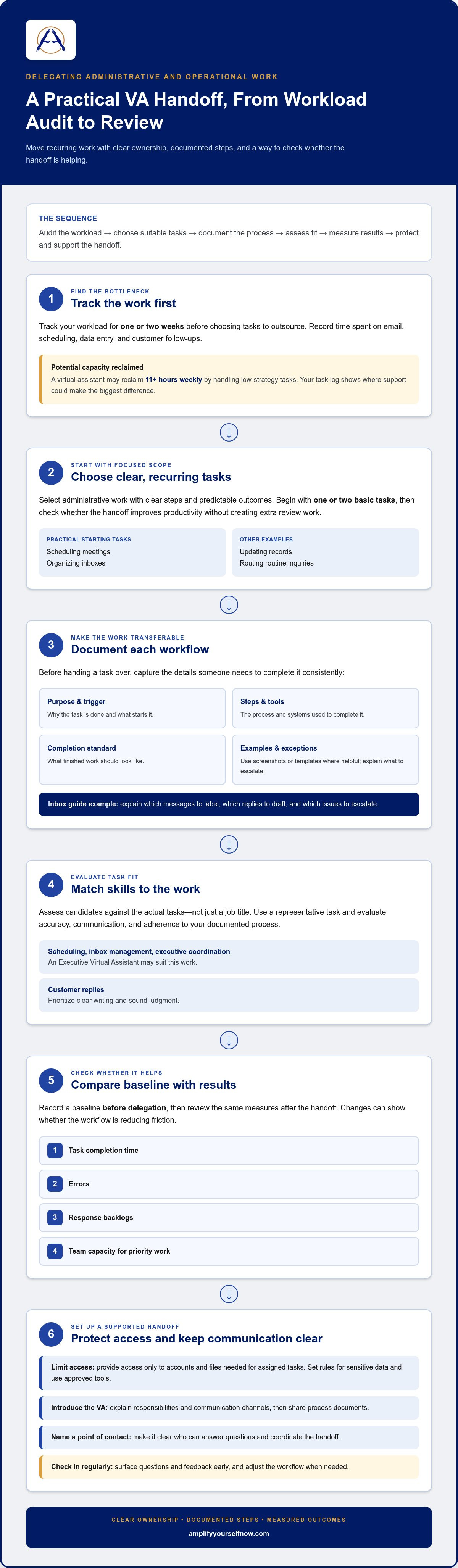
- Track your workload for a week or two before choosing tasks to outsource. Record time spent on email, scheduling, data entry, and customer follow-ups. A virtual assistant may reclaim 11+ hours weekly by handling low-strategy tasks, but your own task log shows where support could make the biggest difference.
- Choose recurring administrative work with clear steps and predictable outcomes. Scheduling meetings, organizing inboxes, updating records, and routing routine inquiries are practical starting points. Begin with one or two basic tasks, then assess whether the handoff improves productivity without creating extra review work for the team.
- Document each workflow before handing it over. Note the task’s purpose, trigger, steps, tools, and completion standard. For example, an inbox guide can explain which messages to label, which replies to draft, and which issues to escalate. Add screenshots or templates when they make the process easier to follow.
- Match candidates’ skills to the work, not just the job title. An Executive Virtual Assistant may suit scheduling, inbox management, and executive coordination. For customer replies, prioritize clear writing and sound judgment. Assess how candidates handle a representative task, including accuracy, communication, and adherence to your documented process.
- Measure whether the hire helps by tracking task completion time, errors, response backlogs, and the team’s capacity for priority work. Record a baseline before delegation, then review the same measures after the handoff. Changes in these indicators can show whether the new workflow is reducing friction.
- Protect business information by limiting access to the accounts and files needed for assigned tasks. Set clear rules for sensitive data and use approved tools. Introduce the VA to the team, explain responsibilities and communication channels, then share process documents and name a point of contact. Regular check-ins help surface questions and feedback early.
Defining the VA role and job description
- Define the result the assistant should produce before settling on a broad title. For example, decide whether the role should keep an executive calendar current, prepare meeting materials, or manage routine follow-ups. Clear outcomes help business owners explain the position to employees and connect it to existing priorities.
- Set a realistic workload before writing the job description. One example is five hours per week for maintaining a calendar and preparing recurring reports. Name the tasks, deadlines, and handoff points. If the workload grows, review priorities before adding responsibilities.
- Separate routine decisions from work that requires employee or owner judgment. Specify which messages the assistant can answer, which requests to route, and what requires approval. These boundaries help prevent duplicated effort and show the assistant how to handle exceptions.
- List the skills each task requires. Calendar coordination calls for organization and clear communication; specialized reporting may require experience with relevant tools. In interviews, ask candidates how they would handle realistic scenarios and compare their answers with the role requirements.
- Define success in observable terms. For a scheduling role, that might mean keeping appointments organized, following stated preferences, and flagging conflicts promptly. Set the communication channel, update format, and escalation process so employees know the status of the work.
- Share the draft with employees who will work alongside the assistant. Ask them to identify unclear handoffs, missing context, or tasks that should remain with their team. Use their feedback to refine the scope before hiring. To shape the role around your needs, schedule a conversation about your hiring plan.
Involving Employees in Hiring a Virtual Assistant
- Hold a focused team discussion before announcing a hiring decision. Ask employees which handoffs, delays, or routine tasks consume time without requiring their judgment. The National Institute of Standards and Technology emphasizes understanding workers’ needs, expectations, and desires before significant changes. Record concrete examples, such as repeated follow-ups or calendar coordination.
- Invite the employees closest to the work to map an existing process. For example, ask the person handling customer inquiries where requests arrive, which need a response, and which issues require escalation. Their input reveals how a VA could support the current workflow.
- Explain the role’s purpose in operational terms. Identify which tasks may move to the assistant, which decisions remain with employees, and how handoffs will work. If the assistant organizes incoming requests, clarify who handles complex cases. Getting buy-in from your team to hire a VA is easier when staff understand how responsibilities will be shared.
- Include relevant employees in candidate evaluation. Give candidates the same work-related scenario, such as sorting sample requests by urgency. Ask employees to assess communication, accuracy, and judgment against agreed criteria. Their feedback may surface practical concerns a manager could overlook.
- Choose one team contact to coordinate questions during the transition. That person can clarify task ownership and share updates through an agreed channel. For example, a status note can show what the assistant completed and where employee input is still needed. This gives everyone a clear way to resolve issues.
- Set a review point after the first handoffs. Ask employees what has become easier, where instructions remain unclear, and whether any task is creating extra work. Getting buy-in from your team to hire a VA depends on acting on that feedback. Adjust the workflow and explain what changed.
How do you reassure employees that a virtual assistant will not replace their jobs?
- Address concerns directly before assigning work. Explain why you’re adding support and identify the specific tasks the VA will handle. For example, say they’ll organize meeting requests while employees retain responsibility for client decisions. A clear scope is more credible than broad promises.
- Be precise about what will stay with the team. Name the responsibilities employees will continue to own, such as advising customers, approving exceptions, or setting project priorities. If a task changes hands, explain who handles each step and why. Avoid guaranteeing future staffing decisions unless you can stand behind that commitment.
- Show how support can reduce low-value workload. Compare the current process with the proposed one: an assistant gathers routine information, then an employee uses it to make a decision. This makes the distinction clear. The VA handles preparation; the employee applies context and judgment.
- Invite employees to shape the handoff. Ask which parts of a task require their expertise and which follow a repeatable process. For example, an employee might define how to sort incoming requests, while the assistant organizes them for review. Their input gives the team a meaningful role.
- Set a review process before work begins. Agree on how employees can flag duplicated tasks, unclear ownership, or added workload. Review a real handoff together and adjust instructions if the assistant’s work creates avoidable rework. Respond to concerns with a clear action, not a vague assurance.
- Share updates based on observable results. Explain which tasks moved, what employees now have time to focus on, and where the process needs refinement. A brief team check-in can surface concerns early. To plan support around your team’s priorities, schedule a conversation about your delegation needs.
Amplify Yourself: Executive Virtual Assistant
Amplify Yourself helps business owners find and onboard an Executive Virtual Assistant for recurring administrative and operational work. If your team has identified tasks to delegate but needs help finding the right person, this can be a practical next step. A clear role definition and agreed handoffs give the assistant a useful starting point and show how the support fits your operations.
For other defined needs, Amplify Yourself also recruits Customer Support Representatives and E-Commerce VAs. Choose based on the work your team needs covered, then align responsibilities with your documented processes.
To discuss support for your team, schedule a conversation with Amplify Yourself.
Make Delegation a Durable Part of Growth
Hiring support isn’t a one-time fix; it’s an operating choice that should evolve with your business. As marketing and business automation consultant Frank Novak emphasizes, combining delegated tasks with automated workflows ensures businesses scale smoothly without overloading their teams. As priorities shift, revisit which work deserves your attention, where your team adds the most value, and what support could remove friction next. That ongoing conversation keeps delegation connected to real needs rather than assumptions.
Getting buy-in from your team to hire a VA isn’t a one-time approval. It grows when employees see their input shape how work gets done and leaders keep communicating as responsibilities change. Treat each delegation decision as a chance to improve how the business works, not simply add another person to the process.
When you’re ready to explore support for your team’s next stage, connect with Amplify Yourself. Bring the work you want to move forward and the outcomes you want your team to own. A clear next step can help your team work with greater focus.
Frequently Asked Questions
Should you hire a VA?
Yes. Consider hiring a VA when repeatable work is taking time away from responsibilities only you or your employees can handle. Review a typical workweek and identify tasks that recur, follow a clear process, and have an accountable owner. If you can explain the desired result and make time for oversight, you have a practical basis for deciding whether support fits your business.
What can a VA do for my business?
A VA can handle customer support, e-commerce, bookkeeping, and marketing tasks, depending on their skills and your needs. For example, an E-Commerce VA can update product information and organize order records, while a Bookkeeper can help maintain financial records. Define approval boundaries for each assignment, especially when work affects customers, payments, or business records.
How do you explain the benefits of hiring a virtual assistant to your team?
Explain how the support can improve the team’s work, not just free up the owner’s time. For example, a VA can organize routine customer requests, giving employees more room to resolve complex issues. Invite the team to identify where that change would help most, then explain how you’ll review the handoff and respond to feedback.
What concerns do teams have about hiring a virtual assistant, and how can you address them?
Employees may worry about job security, added training, mistakes, or access to sensitive information. Address each concern with a specific plan: explain the role’s purpose, identify who will provide instructions, and describe how work will be reviewed. For access concerns, grant only the account permissions needed for assigned duties and clarify how employees can report a problem.
How do you define roles and responsibilities between staff and a virtual assistant?
Assign one owner to each output and clarify who completes, approves, and receives the work. For example, a VA might prepare a client onboarding packet while an employee reviews it before it goes to the client. Record decision rights, handoff points, and escalation paths in a shared reference so staff can resolve overlap without guessing.

READY TO GIVE US A TRY?
Get Started for Free Today!
We'll connect you with top overseas talent for all your business endeavors.
Call 925-515-9343
Email: [email protected]


Privacy Policy | ©2026 Amplify Yourself, LLC. All Rights Reserved
Instagram
LinkedIn